
Basics
How to schedule a Discord message for a set time
Marcus · builds Fylgra ·
In short
Discord is testing scheduled messages, but only for randomly selected users. If you see "Schedule Message" in the plus menu, you can use it. Discord has no scheduling for your team or for bots. For that you need a bot that posts at the set time itself.
Opens “Add modules” with Planner on your server. You'll sign in with Discord first.
What this is about
The announcement should go out at 6 pm, the game night reminder every Friday. Discord can only do this in a limited way: scheduled messages are a test that not everyone has. Discord has no scheduling for your team or for bots.
How to do it in Discord
Scheduled messages: a test for some users
Discord is testing scheduled messages: you pick a time, and Discord then sends your message in a channel or a direct message. Randomly selected users get the test. You can't apply for it, support can't switch it on for you, and it can disappear again.
Here's how to check whether you have it:
Type your message in the text box, but don't send it.
Click the plus sign in the text box. On your phone, press and hold it.
If you see Schedule Message, choose it.
Set the date and time and confirm.
If Schedule Message is missing, you're not in the test. There's nothing you can do about it.
In the Scheduled Messages list you can send a message straight away with Send Now, change it with Update Scheduled Message or delete it with Cancel scheduled message. The test also has Schedule Poll.
What the test can't do
Your account only. The message comes from you. There's no setting that lets your team or a role schedule for the server.
Limited number. How many messages you can schedule at once is limited. Nitro raises the limit.
No repeats. Discord can't schedule a message that comes back every week on its own.
Not for bots. Discord doesn't offer bots scheduled messages. A bot has to send at the right time itself.
Without the test
Then you either send the message yourself at the right time, or you use a bot that posts on a schedule.
A Discord event doesn't help here. It announces a date on the server, but it isn't a message in a channel.
How to tell it worked
At the time you picked, your message appears in the channel under your name.
With Fylgra
With the Planner module, Fylgra publishes posts, polls and events at a set time. It works on every server, without Discord's test. Anyone you give Edit for the Planner under Access can schedule too. With View they only see the entries. If the module is missing, add it under Modules › Add modules.
Open Planner in the sidebar and click Schedule new.
Under What do you want to schedule?, choose the Post card.
Under Time, choose At a set time and pick the date and time under Will be posted on.
Under Text and image, enter the Text. Use Choose image to attach an image if you like.
Choose the Channel and click Schedule it.
For the Friday reminder, open Schedule several times before scheduling and switch on Create several entries at an interval. You can choose every 1 to 365 days, 2 to 52 entries.
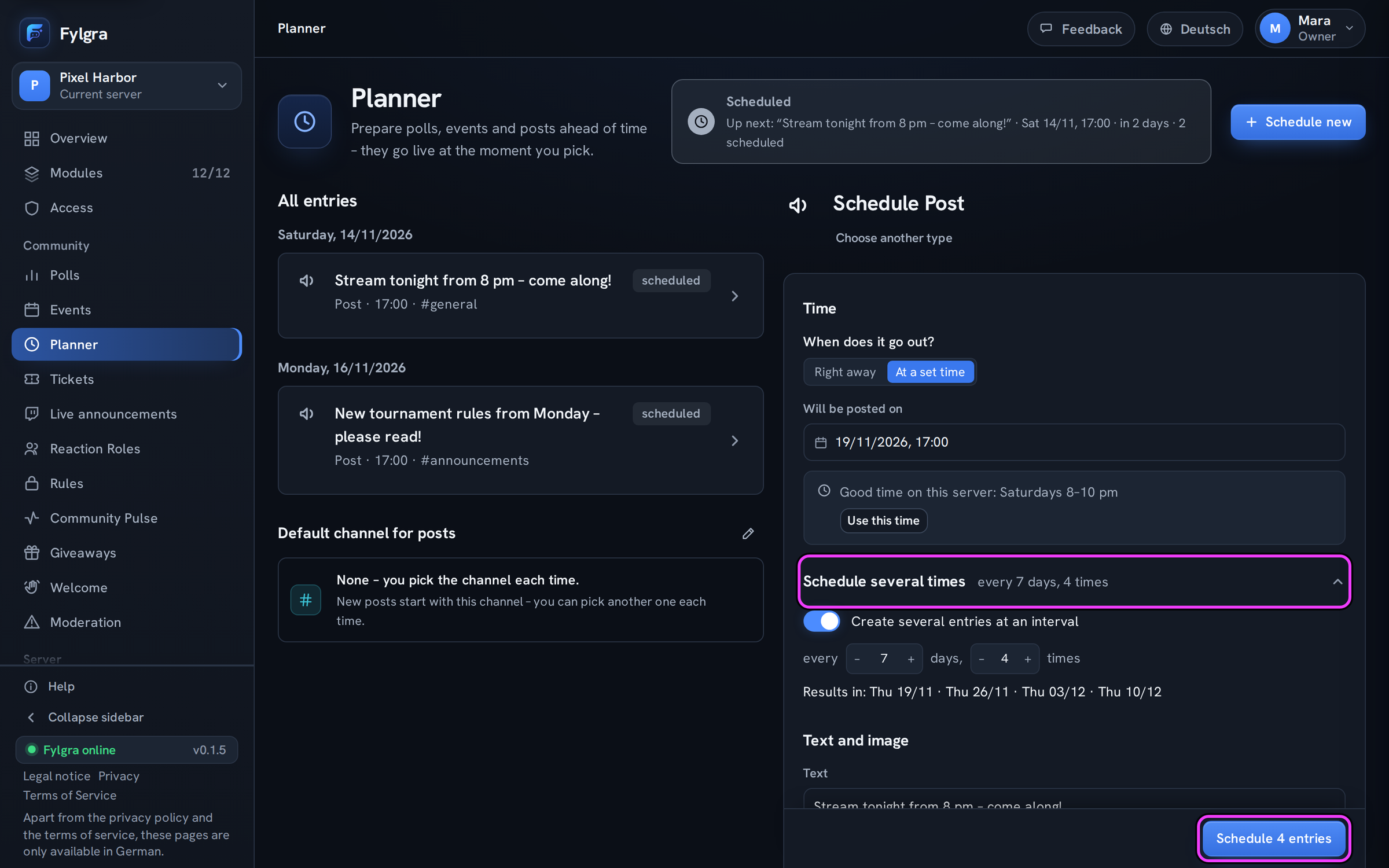
The limits:
The post comes from the "Fylgra" bot, not under your name.
The text can be up to 2000 characters.
Schedule several times creates a fixed number of entries, not an endless repeat. After the last one, you schedule again.
If the channel is locked for @everyone, the "Fylgra" role needs View Channel and Send Messages there, plus Attach Files for an image.
You schedule polls and events the same way with their cards. More in planer-beitrag-einplanen and planer-klappt-nicht.
Not working?
- Geplanter Beitrag ist nicht erschienen Troubleshooting · Planner · German
Still stuck? Write to me – I'll help. Send a report or email fylgra@fylgra.com
Related articles
- Beitrag im Voraus planen Guide · Planner · German
- Geplanten Eintrag ändern oder stornieren Guide · Planner · German