
Basics
Discord: restore a deleted channel or role
Marcus · builds Fylgra ·
In short
Discord can't restore a deleted channel or role – there's no recycle bin. You create both again and set permissions and roles back by hand. The messages of a deleted channel are gone for good.
Opens the page on your server. You'll sign in with Discord first.
What this is about
A channel is gone, or a role is suddenly missing: a wrong click, someone on the team tidying up, a hacked account. Discord has no recycle bin and no undo.
For a channel, all messages are gone, including threads and pinned messages. Invite links to it may no longer work.
For a role, Discord no longer knows who had it or its permissions in individual channels.
You can recreate the structure, but not the messages. For the audit log you need View Audit Log.
How to do it in Discord
The steps apply to Discord on a computer and in the browser.
1. Find out what was deleted
Click your server's name at the top left and choose Server Settings › Audit Log.
Under Filter by Action, pick the action, for example deleted channels or roles.
Click an entry to expand it.
You'll see who deleted what and when, often with the old name. Discord keeps these entries for 45 days.
2. Create the channel again
In the channel list, click the + next to the old category.
Choose the type, such as Text or Voice. If it was private, turn on Private Channel right away.
Enter the old name and click Create Channel. It takes over the category's permissions.
If it had its own permissions, set them again under Edit Channel › Permissions.
Quicker, if a similar channel exists: right-click it › Duplicate Channel copies settings and permissions, but no messages. If a whole category was deleted, its channels stay, without a category. Create the category again and drag them back in.
3. Create the role again
Under Server Settings › Roles, click Create Role.
Enter the old name, pick the colour and set the old permissions under Permissions.
Drag the role back to its old place and click Save Changes.
If it had its own channel permissions, set them again under Edit Channel › Permissions.
Give the role back: right-click the member › Roles › tick the role.
Discord has no list of who had the role. Members simply pick self-assignable roles up again.
4. Prevent it next time
Only give Manage Channels, Manage Roles and Administrator to a few people.
Record your server's structure with a server template, see Back up your Discord server with built-in tools.
Require two-factor authentication for moderators: Server Settings › Safety Setup › Require 2FA for moderator actions. Only the server owner can do this, and they need 2FA themselves.
How to tell it worked
The channel is back in its place, and only the right roles can see it. The new role shows in the members' profiles.
Common pitfalls
New channel, new ID. Old links and mentions lead nowhere, and bots that knew the old channel need setting up again.
The role can't be dragged to its place. You can only create and move roles below your own highest role.
Permissions are too open. The new channel takes over the category's permissions. If it was private, set that again straight away.
Restoring messages doesn't work, not even in a roundabout way.
With Fylgra
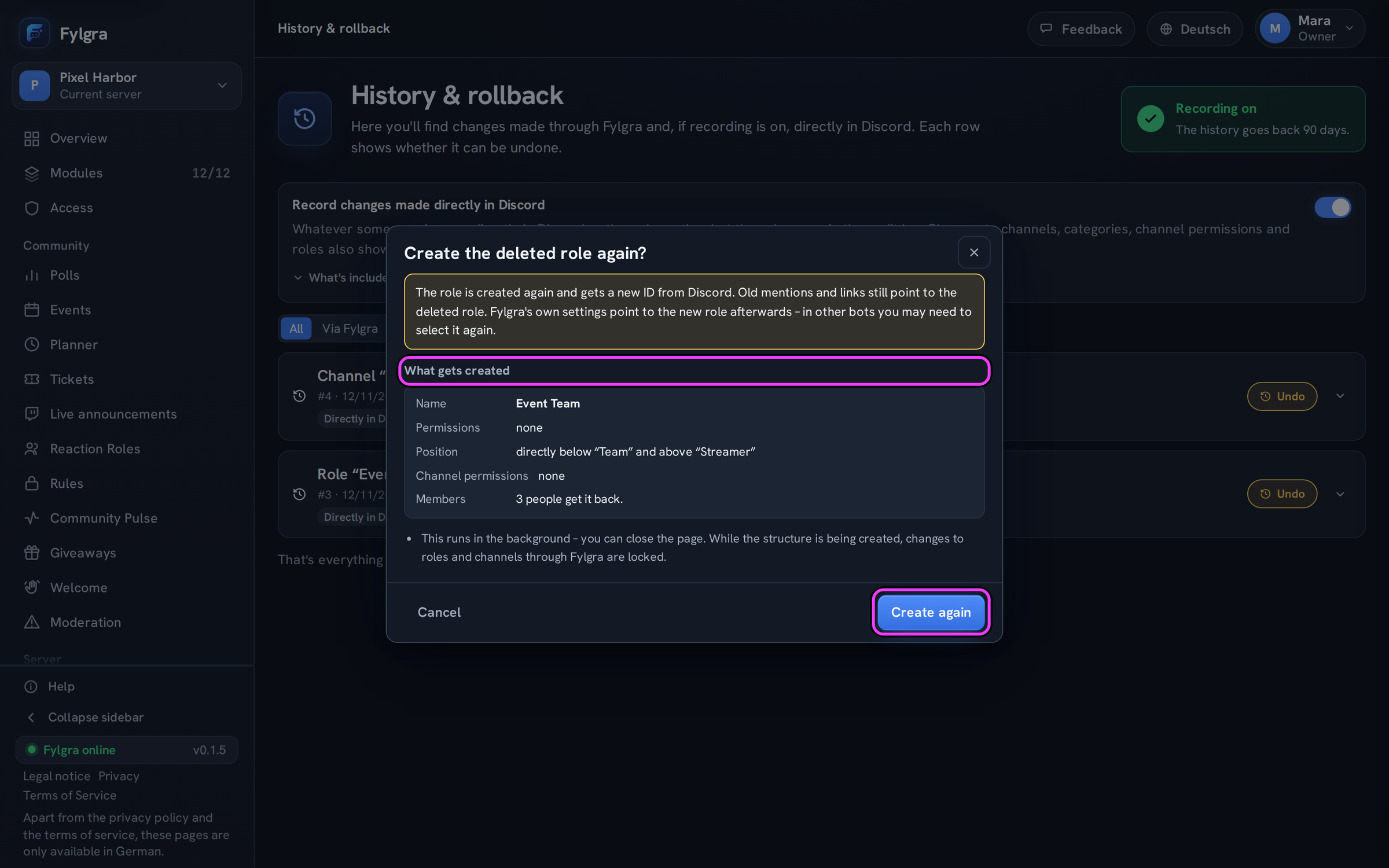
Fylgra only helps if it was on your server before the deletion. Then it can often create deleted things again, with permissions and members, but without messages:
History & rollback lists deletions made through Fylgra, and with the label Directly in Discord also those made in Discord. For that, Record changes made directly in Discord has to be on (it is by default), and Fylgra has to see the audit log.
On the entry role deleted or channel/category deleted, click Undo, then Create again.
A role comes back with its name, permissions, position, channel permissions and members – the members only up to 30 days after the deletion. Fylgra leaves out permissions its own role lacks, usually Administrator; you set that tick yourself. A channel comes back with its name, type, category, settings and channel permissions.
Fylgra switches its own modules to the new channel or role, other bots not.
If the deletion isn't in the history, a backup from Backups & Templates helps, if you created one.
Recording happens on every plan. Anyone with Manage Roles in Discord can undo, for channels too. For a role, your highest role must have been above it; for a channel, you also need Manage Channels. More in loeschen-zuruecknehmen.
Not working?
Still stuck? Write to me – I'll help. Send a report or email fylgra@fylgra.com
Related articles
- Back up your Discord server with built-in tools Discord know-how
- Gelöschte Rolle, Kanal oder Kategorie zurückholen Guide · Server Structure · German
- Backup wiederherstellen Guide · Backups & Templates · German
- Änderungen direkt in Discord sehen Overview · Server Structure · German